

After moving the projects folder “c:ProgramDataAutodeskRevit Server 2025Projects” from one physical server to another, you might encounter a situation like in the screenshot – Revit Server is unavailable.
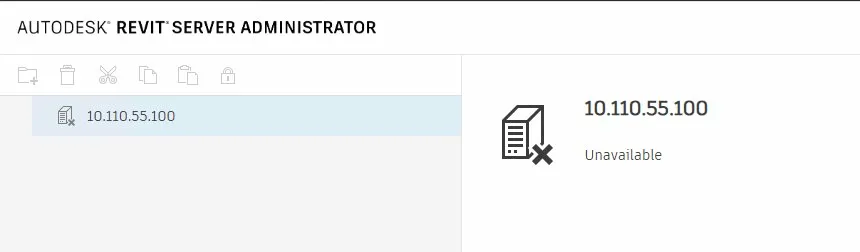
The first thing to check is the presence of the RSN.ini file, which should point to the new server’s actual local address, located here:
c:ProgramDataAutodeskRevit Server 2025ConfigIf that doesn’t help, your Revit Server likely has permission issues with the files you moved. Here’s what to do in PowerShell as an administrator:
# Permissions for Projects
$p1 = "C:ProgramDataAutodeskRevit Server 2025Projects"
takeown /F $p1 /R /D Y
icacls $p1 /grant "IIS AppPoolRevitServerAppPool2025:(OI)(CI)F" /T
icacls $p1 /grant "SYSTEM:(OI)(CI)F" /T
icacls $p1 /grant "Administrators:(OI)(CI)F" /T

# Permissions for Cache
$p2 = "C:ProgramDataAutodeskRevit Server 2025Cache"
takeown /F $p2 /R /D Y
icacls $p2 /grant "IIS AppPoolRevitServerAppPool2025:(OI)(CI)F" /T
icacls $p2 /grant "SYSTEM:(OI)(CI)F" /T
icacls $p2 /grant "Administrators:(OI)(CI)F" /T

# Permissions for the entire folder just in case
$p3 = "C:ProgramDataAutodeskRevit Server 2025"
icacls $p3 /grant "IIS AppPoolRevitServerAppPool2025:(OI)(CI)F" /T

# Restart
Stop-WebAppPool -Name "RevitServerAppPool2025"
Get-ChildItem "C:ProgramDataAutodeskRevit Server 2025Projects" -Recurse -Filter "*.lock" | Remove-Item -Force
Start-WebAppPool -Name "RevitServerAppPool2025"
You can investigate your local issue in more detail here:
c:ProgramDataAutodeskRevit Server 2025Logs